Showing posts with label Virtual Agent. Show all posts

Friday, March 27, 2020

Covid19 - Corona Virus Info Bot - Power Virtual Agent

The Covid19 / Corona Virus pandemic has created major concerns for people all over the world. I hope everyone is safe and taking precaution by staying at home. This blog is to about how to create a Covid19 Safety Info Bot using Microsoft Power Virtual Agent.

The problem - Currently governments at National / State / County / City / Town and Health Care organizations are all trying to provide the information to their citizens. There is a ton of critical information that needs to be provided. People are given a phone # to call which is managed by Call Centers. The Call Centers personnel are having a crisis where the staff have to take risks, travel and be in the call center offices to respond to the callers. Also the volume of call is causing delays and chaos to the people.

Solution -
There are many ways to provide the information to the people. One powerful and simple solution option is to create a Power Virtual Agent Bot and add the same to the Government or Commercial organization Website portal.

The link for the sample bot I have created is here - https://tinyurl.com/rld8gsd (available upto April 19th, 2020)

Corona Virus Info Bot - Sample


Solution details - Here are the steps I took to create the Power Virtual Agent Sample Corona Virus Bot -

1. Create a Power Apps environment - You will need an environment in Power Apps. You may already have a Power Apps account or need to create a new account. You can also create a trial for Power apps at https://powerapps.microsoft.com/en-us/# or trials.dynamics.com
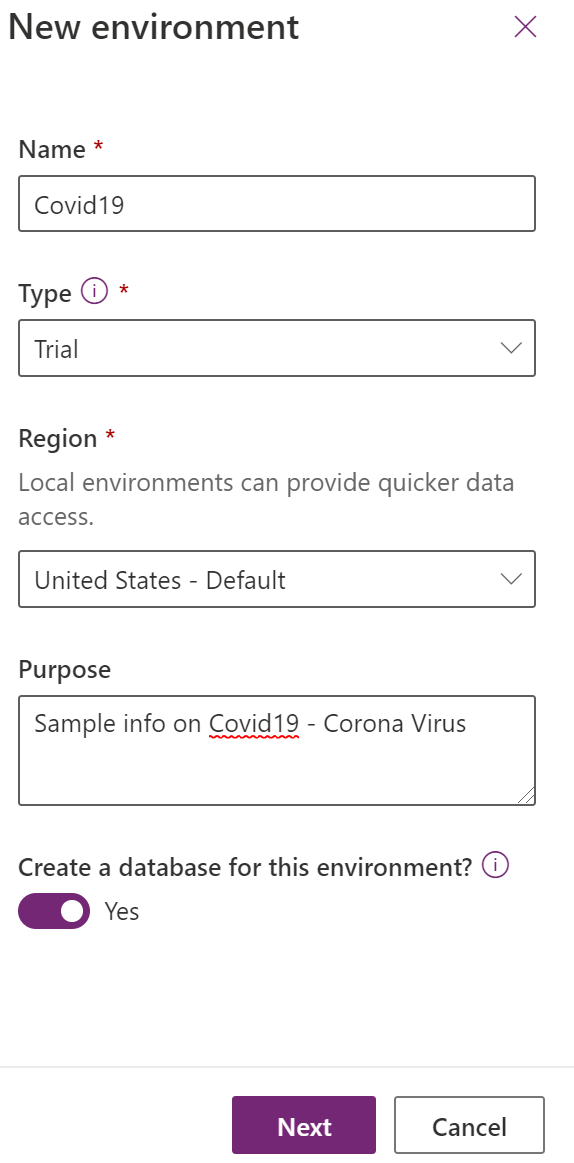
New Power Apps environment 

Once the environment is created with a database you are ready to go with Power Virtual Agents.

2. Set-up a Power Virtual Agent bot - Go to https://powerva.microsoft.com/ You can log in with the same above Power Apps account. Create a new Bot and attach the Bot to the Power Apps environment.

3. Once the Bot is created you need to create the Topics. Adding Topics allows you Bot to answer specific questions based on trigger phrases and provide correct messages.
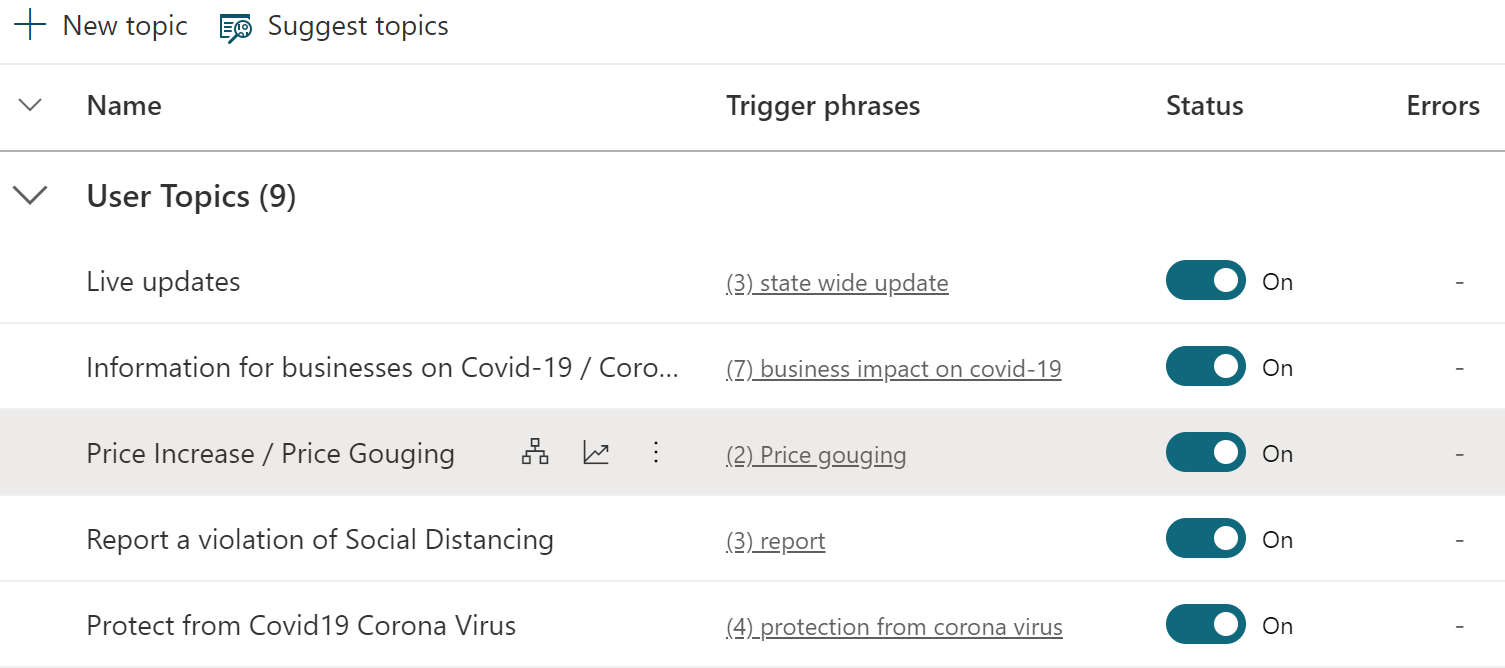
Topics 

Refer the below topic details and trigger phrases to protect from Corona Virus
Protect from Corona Virus - Topic and Trigger phrases

You can also see the Topic and message on the authoring canvas

Authoring Canvas

4. You can also customize your greeting - the info that the Bot will provide to the customer
Customized Greeting
5. Once you have the Bot configured you can test the Corona Virus Bot and than publish it.

Test and Publish Bot

You can embed the Bot in your website or portal. Here is the sample website for the above Covid19 - Corona Virus Bot which will be available online upto April 19th 2020 for testing.

https://tinyurl.com/rld8gsd

Hope this info helps you to create your own Bot and add it to the organization website. Please let me know if you need any help in creating and configuring the Bot. Thanks for reading. Stay at home and be safe for now.

@mihircrm
365withoutcode


Wednesday, February 27, 2019

Whats New in April 19' update - Omni Channel Engagement Hub

This blog is part-1 of a series of blog on what I find is new and interesting in the April-19 update of Dynamics 365 Customer Engagement.
Microsoft has provided a list of updated and new features in the April 2019 update release notes. I had written earlier about the Sales AI capabilities in Dynamics 365. This blog focus is on Customer Service and specifically the very new upcoming feature called Omni Channel Engagement Hub.

As the medium of social network is increasing, customers are demanding to communicate, connect and get response from organizations on any channel and from any device / location / time. This has challenged organizations big and small leading to a new breed of apps that help connecting with customers on non-traditional channels.

The challenge here is to integrate the new communication channels with existing Enterprise systems of engagement.

Microsoft has taken cognizance of this phenomenon and has introduced the Omni Channel Engagement Hub, which is a cloud based service to enable organizations to instantly connect and engage with their customers via channels like Live Chat and SMS. And there is an Dynamics 365 app, which helps Customer Service Agents to respond and engage with customers using those channels.

Agents can utilize the omni-channel Engagement Hub via Dynamics 365 online using the Unified Interface or by using Unified Service Desk (USD)

USD has the integration to the existing telephony system for Call Center operations. As the channels are new and not limited to just phone calls, it will now become a Contact Center operation.

There is built in dashboard for Supervisors to track and monitor the contact center productivity KPI's, Additionally Supervisors can consult and assist customer service agents in issue resolution.

With the April-19 release organization will be able to create their own chat bots which will be part of the Customer Service Virtual Agents using Microsoft Bot Framework.

The Omni Channel Hub integrates with D365 Customer Service Virtual Agent (Chat Bots). CS Virtual Agent will allow routing incoming chat requests to Virtual Agents (Chat Bots) in case of peak loads. If there is a necessity for escalation the discussion can be routed to a human agent with all prior details about the chat with customer.

Virtual Agent (Chat Bot)


So to give you a better idea for above - Consider a scenario
A bank is using Dynamics 365 Customer Service with the Omni Channel Engagement Hub and Virtual Agents (Chat Bots) it has created.
If a customer wants any information they can search the knowledge base as self service.
If they need further help they will be able to have a chat with the customer service virtual agent - the Chat Bot. Chat bot will use the data from Knowledge Articles created from similar cases to provide the information needed. If additional help is needed the discussion can be routed to a human agents queue giving the customer a seamless experience.

Routing of Chat 
I hope you are as excited as I am to get my hands on creating chat bots in Dynamics 365 without any code and transforming the customer experience. This is currently scheduled to be available in preview @ April 19'. We may just need to wait till it is out of preview and general available. Till than keep reading.

Mihir Shah
365WithoutCode