Showing posts with label #IntelligentAutomation. Show all posts

Monday, November 28, 2022

What's New in Power Platform - Process Mining

 This is a continuation of my blog series - What's new in Power Platform for the 2022 Release 2. This time the focus is on Process Mining using the Process Advisor. I will discuss here the need for a business process review and how a tool like process advisor can be useful for the organization. There are some paradigms to reflect upon,

"That's how we have always done it"

Organizations have been running business processes for ages on their ERP / CRM platform of choice. The processes may get modified over time and there may be "process debt" which is some old process that is still leftover in place because that was the way the system was set-up. In fact I have asked many clients why they do it in a certain way and the most common answer was "that's how we have always done it here!!"

"We are special" 

Another common answer to the question is "we are special" or "our business is unique". Every client is unique in the way they want to operate their business processes and that can create an ego issue when recommending solutions. I have worked with Clients who have changed their Systems three times but they refused to modify their business process. It is always the systems fault!!

"You cannot improve what you cannot measure"

I normally look for quantifiable data to prove to the client the benefits of a process change. When I ask the Client for any measurement on their business process KPI's they are looking at me as if I am from another planet. What's the point of implementing a system whose performance you cannot measure? How do you ensure the process is working or not? How do you plan to improve??

 That is where the Process Mining can help. It may be time to re-evaluate your current CRM / ERP processes. This will help in -

1. Setting a baseline - How are we doing today? How fast do we complete a Customer support case? What is our Lead to Opportunity conversion ratio?

2. Identify process bottlenecks - What is the longest stage / step in providing a Customer quote? Where does the Case gets stuck the most? How many variants of the process are there?

3. Automate - Identify what can be automated? Provide a business case for automation? How much can we decrease the Call Center agent time by automating certain steps? Do we really need to wait for an approval for all Cases? 

4. Re-evaluate your process - Is it required? obsolete? What are the competitors doing? What can we improve? Are we in compliance?

 Microsoft has recently announced the public preview of the Process Mining capabilities with Minit and Power Automate Process Advisor. 
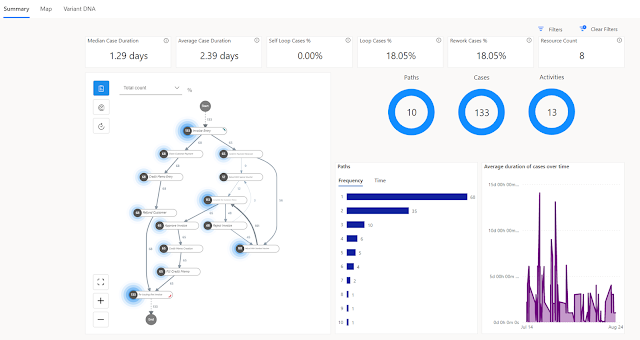
Process Mining - map and dashboard

Some of the new capabilities added to the Process Advisor are detailed here -  https://learn.microsoft.com/en-us/power-automate/process-mining-overview

Highlights -

  • Improved web experience 
  • New Minit Desktop App for deeper analytics 
  • Customizable reporting using Power BI and new pre-built templates

In order to get all the benefits of Process Mining you may require multiple licenses that includes - Power Automate per user, Power BI premium, Microsoft Dataverse etc. If you already have all the required licenses why not try and make use of Process Mining today?

I will write more about the new Process Mining capabilities in my future blogs. Till then let me know what is your thoughts on Process Mining and how it can help to change your business processes. Thanks for reading.

@mihircrm 

365WithoutCode


Monday, January 31, 2022

Intelligent Automation using Power Automate as a Platform - Introduction

Globally as demand for products and services increases there is a need for automation. Intelligent Automation is the combination of multiple automation technologies infused with AI. Intelligent automation, also known as Cognitive automation can help organization to achieve gains in operations productivity and efficiency, enhance business outcomes and gain insights for making better business decisions. This blog introduces Intelligent Automation (IA) and how Microsoft Power Automate can be utilized as a platform for Intelligent Automation.

Enterprises today have challenges with the ability to provide service across multiple digital platforms. The customer expects better standard of services with faster turn around times. Some of the use cases of Intelligent Automation are described below -

1. Finance - AP process - In an organization the finance Accounts Payable specialist may need to automate the daily task of receive an email from Vendor with a attachment of invoice, printing and manually enter the invoice in ERP system. In addition to entering the invoice the IA can also review the invoice, compare against the Vendor PO and detect any anomaly to provide insights to the business.

2. Customer Service - Receive a customer request for warranty service repair. Search and find the customer agreement on warranty repair, confirm it is a valid request. Prepare and send an RMA and Shipping instructions email to the Customer. In addition the IA can also do analysis on the Items being returned to notify the business of any issues found with returns of the same item from multiple customers. 

3. HR - New Hire onboarding process - The enterprise HR department can automate the various steps in new hire on-boarding. They can also help in guiding the new hires in the process and getting them the needed IT authorizations and assets like laptops etc. IA can help in streamlining the onboarding so it is a great experience for the new hires.

There are many such business scenario where intelligent automation can be applied to automate the process and reduce the effort.  The main benefits of applying Intelligent Automation (IA) for enterprise organization are -

1. Improve productivity and reduce operational costs - IA when applied to automate manual tasks at scale the organization gets benefitted due to improved process efficiencies and / or productivity. This also reduces the operations costs. 

2. Consistent processes - Another benefit is the consistency of processes across business units and improved accuracy and less manual errors due to automation. 

Lead to Opportunity Sales process with Cloud workflow

2. Enhance Customer experience- Intelligent Automation can provide faster turnaround and consistent delivery improving the quality of products and services which ultimately leads to a better customer experience.

3. Compliance and Regulations - Intelligent Automation can help organizations in complying with Industry procedures and provide reporting for Government regulations. 

Intelligent Automation platform with Power Automate can use the Microsoft Low code Power Platform automation and AI technologies when applied to improve business operations -

1. Digital Process Automation (DPA) - This is using cloud workflows to automate and integrate business processes. Power Automate provides cloud based workflow automation capabilities with 400+ connectors to many SaaS applications including Dynamics 365 and Salesforce. 

2. Robotic Process Automation  (RPA) -  Also known as UI automation which helps organizations improve their manual processes by automating the back office tasks. For example this can be done by capturing the clicks on the desktop and automating the manual processing of data. Power Automate Desktop is the RPA tool that can help in automating legacy business processes. 

3. Business Process Automation (BPA) - This can be used for automating business workflows like a Lead to Opportunity to Sales process. This helps in managing a consistent business process throughout the organization. The steps in the process can be automated that helps in improving the process efficiency. The standardized process can also help in interactions and engagement within the Sales team.

4. AI - AI when added can become the decision engine for automation. AI can be in the form of machine learning or cognitive algorithms that can recognize process patterns and make inferences for business. They can also detect anomalies or provide prediction based on the process data. In Microsoft Power Automate we can use AI builder to automatically process forms and documents, detect and identify images, text analysis and much more. 

AI builder in Power Automate

5. Process Mining - Process Mining can help in understanding and identifying the business process bottlenecks and select processes that can benefit from automation. Microsoft Power Automate includes Process Advisor that can help organizations in gaining deeper insights and optimizing business processes.

The combination of the above Intelligent Automation technologies can help Enterprise organizations in accelerating their digital business transformation goals and improve business outcomes. Let me know if you have implemented Power Automate for Intelligent Automation. Thanks for reading.

@mihircrm

365WithoutCode