Showing posts with label Dynamics CRM. Show all posts

Tuesday, January 14, 2025

Designing an effective Power Platform Tenant strategy


In today's landscape where AI and digital transformation is at the forefront, leveraging tools like Microsoft's Power Platform can revolutionize the way organizations operate. With its suite of low code  apps—Power BI, Power Apps, Power Automate, and Microsoft Copilot —powerful business insights, custom apps, automation, and AI-driven chatbots, AI agents are just a few clicks away. However, to truly maximize these low code tools, a robust tenant strategy is essential and the very foundation for success.

Why Tenant Strategy Matters

A well-structured tenant strategy ensures that your Power Platform environment is scalable, secure, and aligned with business objectives. The tenant strategy outlines the setup and management of an organization's environments, including considerations for security, data residency, compliance, and governance. Some of the things to consider are discussed below -

Key Considerations for Your Tenant Strategy

  1. Environment Planning:

    • Development, Testing, and Production Environments: Separate these environments to ensure stability and security. This allows for rigorous testing before deploying solutions to production.

    • Sandboxes: Use sandbox environments for experimental development and to test new features without affecting production data.

  2. Data Residency and Compliance:

    • Ensure that your data remains within specified geographical boundaries to comply with local regulations. This is particularly important for organizations operating in multiple countries.

    • Select the appropriate region for your tenant to optimize performance and meet data residency requirements. 

    • Below is a Global multi-tenant for meeting Data residency requirements.


  3. Security and Governance: - The security and governance policies can be different to meet the local regulatory requirements.

    • Implement Data Loss Prevention (DLP) policies to prevent unauthorized access and sharing of sensitive information. 

    • Define User Roles and Permissions meticulously to safeguard data and applications against misuse.

    • Monitor and manage user activities and usage patterns to detect and address potential security threats.

  4. Scalability: Consider the implication of AI models for future growth planning. 

    • Plan for future growth by considering the scalability of your environment. Ensure that your tenant can accommodate increased workloads and data volumes as your organization expands.

    • Regularly review and adjust your environment settings to align with evolving business needs.

  5. Cost Management: The focus on reducing operations costs will require a constant cost optimization and management approach. 

    • Keep track of the ongoing costs associated with your tenant, including licensing, storage, and premium features. Implement financial controls to avoid unexpected expenses.

Best Practices for a Successful Power Platform Implementation

  • Regular Audits: Conduct frequent audits of your environments and costs to ensure compliance and identify areas for improvement.

  • User Training: Empower your team with adequate training and resources to utilize the Power Platform effectively. Encourage team members to get certified and showcase their talents.

  • Feedback Loops: Encourage users to provide feedback on their experiences and challenges to continuously refine your applications and business strategy.

In conclusion, an effective tenant strategy for the Power Platform isn't just about the initial requirements and setup—it's about creating a scalable, secure, and adaptable environment that can grow alongside your business. By focusing on these key areas, you can unlock the full potential of Power Platform and drive meaningful AI led digital transformation within your organization.

Let me know if this works for you. Thanks for reading.

Mihir Shah                            @mihircrm             365WithoutCode

Thursday, June 15, 2023

10 Things to consider when Managing Enterprise Apps - Microsoft Dynamics 365 on Microsoft Cloud

 Once an enterprise application like Microsoft Dynamics 365 goes live within an organization there is lot of excitement. The project team is happy with the results of the efforts over the year/s. It is the day after going live that the operations team is faced with the post go-live challenges. There are lots of questions on how to support, operate, manage, adopt and scale the new Dynamics 365 application. Microsoft Dynamics 365 in an enterprise cloud environment can be very challenging. There could be multiple integrations with other systems within and outside the organization, compliance and security requirements, business enhancements needs and performance management. This requires planning and coordination with multiple teams. This blog series is about how to prepare and plan for managing of an enterprise Dynamics 365 app. Here are the top 10 things to consider - 


1. Governance (decision making) - There needs to be a governance team in place. There could be multiple operations support teams working on the system for example the application support and maintenance team, the infrastructure and security management team and the application enhancement team. There has to be a defined governance team that may consists of representatives from business, IT, Project and executive management. This helps the operations team to report any blockers, get the guidance and support for the system management. The governance teams meets on a monthly cadence and reviews the teams progress and challenges. They will discuss how to resolve the blockers, improve the operational performance and opportunities for enhancing the Dynamics 365 application.

2. Security and Access control - As the Dynamics 365 application usage increase so does the need to add new users and give them proper access. There could also be challenges with the existing users who may need to modify their security roles, teams and business unit. It is an ongoing challenge to manage the users access and application security which needs to be considered and managed. Assigning a role based user security template will make the access streamlined. 

The tasks for the security team is to regularly review and update user security roles, active directory teams and business units as user responsibilities change. Also remember to remove users and reassign licenses when the users are no longer required to access the app. Finally regularly audit user access logs on a monthly or quarterly basis to identify any unauthorized or suspicious activities. 

3. Data security and integrity - Having a reliable quality data is important for the adoption and success of the Dynamics 365 app. Users should be confident that the data that they rely on to make business decisions is safe and trustworthy. Implement a data governance practice to maintain data integrity and quality. Regularly set reviews, cleanse and maintain data for accuracy, completeness and consistency. Users should be provided training in proper data entry and maintenance standards. 


The data loss prevention rules should be in place to prevent the leakage of data. Sensitive data in the Dynamics 365 app should be protected and secured using field level security. Duplicate detection should be in place and active where needed. It is essential to set-up data validation and duplicate detection rules to prevent erroneous and unreliable duplicate data. Data lifecycle, archival and storage needs to be planned as the data size grows with complexity.

4. Application Performance Monitoring - The Dynamics 365 application and related infrastructure should be continuously monitored for any issues, bottlenecks or maintenance requirements. A mechanism should be in place to trigger alerts and auto create incident support tickets for any identified issues. The error logs, system logs and performance metrics should be reviewed for measuring the performance of the application. Users should be trained in identifying and reporting issues with proper documentation. 

Microsoft provides many options to monitor and manage Microsoft Dynamics 365 and Power Platform. The Power Platform Admin Center has OOTB performance metrics that can be reviewed. Additionally Azure Monitor and Application Insights can be set-up to track and monitor the performance. Additionally you can even use Power Automate to trigger alerts and create incident support tickets.

5. Support Team  - Plan to have a dedicated multi-level support team. The teams can be set-up on a Tiered support level based on the incident complexity, severity and priority. Tier 1 and 2 support can be provided by the organization support helpdesk. Tier 3 support can be provided by the Application Manage Services Partner and Tier 4 support can be from Microsoft product support team. It is important to have the team trained on the business application and on supporting Dynamics 365 and Power Platform.

6. Product updates and upgrades - Microsoft provides 2 major updates annually for Microsoft Dynamics 365. Plan in advance to have the Dynamics 365 updates tested and implemented. 

Safe deployment of updates for Dynamics 365 by region


The business and IT needs will require regular enhancements of the Dynamics 365 application and supporting infrastructure. Ensure proper training of the support team as part of the enhancement of the Dynamics 365 application and infrastructure.

I hope this helps your organization in planning for the post go-live operations and management of the Dynamics 365 enterprise application on Microsoft cloud. Please stay tuned for my next blog where I will discuss the remaining 4 items to consider when managing Microsoft Dynamics 365 enterprise applications. Let me know your thoughts and thanks for reading.

@MihirCRM

365WithoutCode


Friday, February 12, 2021

Power BI Template Apps - Power BI with Dataverse (D365) Part-2

 In my earlier blog I had written about connecting with PowerBI and Dataverse (D365) using the CDS or Dataverse connector. You can also use the Power BI template Apps that Microsoft has provided to see your Sales or Service data in PowerBI.com

As always there are pre-requisites for using the Apps. They are - 1. You need to have a Power BI - Pro license for all users who want to consume the app and also 2. Admin access to install the App and connect to D365.

So now that we have the requisite license and access let us install the template app. There are 3 D365 - Power BI template apps. They are shown below with demo data

1. Sales Analytics. https://tinyurl.com/88g43r2m


Sales Analytics Power BI App

2. Process Analytics: https://tinyurl.com/5ybgdqze

Process Analytics App

(I am not a fan of the background bluish color but that can be removed using PBI desktop as I have mentioned below)

3. Customer Service Analytics: https://tinyurl.com/3a2v2pmg

For this demo I was unable to get the demo data loaded in the app or connect the app to D365. This is from the Appstore -

Customer Service Analytics Power BI

I will write about the Sales Analytics App below -

1. Install - Go to https://tinyurl.com/88g43r2m  and click on Get it now (or in PowerBI.com go to Get Data and search for Sales Analytics app)

2. Once the app is installed you will see the App in PowerBI.com You will be able to see the App with demo data. You can also connect the App to your specific D365 / Dataverse instance. Once connected the D365 instance data will load into PowerBI.com

You get the below different reports in Sales Analytics App. 


3. You can than analyze the data in PowerBI or you can import the dashboard into D365. (I will write more about this in my later blogs)

4. The OOTB app does not have any custom tables and you will need to customize the App. This is now possible by downloading the Power BI report and importing the PBIX file into Power BI desktop.  Use the link below for downloading the Sales Analytics or Process Analytics Power BI report PBIX file.     

        https://tinyurl.com/1royw6my

5. Now you can add the custom tables and columns to the Power BI reports and create your own App.

I believe that the template apps are a very good starting point to use Power BI with Dataverse. Let me know if you have any questions or any other ideas of using Power BI with Dataverse / D365. 

Thanks for reading

@mihircrm / 365withoutcode

Thursday, August 3, 2017

Dynamics 365 online or on premise ?

        This is an age old question and I thought that cloud had won the battle. But that is not always the case and business are still debating about going online and staying on premise. There is also not one single answer to the question, as each business case is different and needs to be evaluated. Businesses focus on the costs or/and features (capabilities) of going online in the cloud vis a vis staying on premise. 

      There are many other aspects that needs to be considered before deciding on the route of going online or on premise with any business app including Dynamics 365. I think the points below are relevant for all business app cloud decisions and needs to be considered by management. This blog focuses on the aspects and differences in the cloud decision for businesses considering Dynamics 365. 

The major aspects to be considered are –

1.      Strategic
2.      Security
3.      Financial
4.      Dev Ops / Maintenance
5.      Functionality / Features


1.      Strategic – Moving the business applications to cloud is a strategic decision. There are many factors –
a.      Gain competitive advantage - IT and business users can focus more on building and supporting their core business applications and improving operations instead of managing the supporting IT infrastructure needed for on premise apps management.
b.      Go Digital faster – Going digital with business applications enable faster go to market capabilities for business and keeps them ahead of competition. Customers needs and demand change and to respond to the same it becomes imperative to embrace the cloud platform
c.      Cultural change – Once a decision is made to go online it is also important to stay online. This requires a cultural change for both IT and business ops teams. Some of the changes include embracing design thinking and agile development and delivery.
d.      Microsoft cloud – Dynamics 365 alone cannot be the consideration for going online. We also need to include Office 365 and Azure platform in the decision making.  Businesses need to be able to add and manage all 3 Microsoft cloud offerings

2.      Security – Security was a major concern when moving to the Cloud. With Azure active directory integration it enables the D365 online app to be as secure as on premise. In addition Microsoft has built data center for major countries / regions for example data center for Euro. Also data centers are created for Government agencies requiring FedRamp and Hippa supported. This make security a less of a concern than before for major business apps.

3.      Financial – CFO and Controllers make decisions on the financial aspects of going online or on premise with business apps. From a pure licensing cost basis it may look like staying on premise is the way to go. But this is deceiving. As there are other on premise costs which needs to be accounted for like – IT infrastructure support which includes the hardware, server, ongoing maintenance, services, rent…
      At the same time the cost of Cloud needs to be considered with the following - 
      1. App development
      2. IT infrastructure - upgrade / update / IT re-skilling
      3. Data migration & user training
      4. Integration


4.      Dev Ops / Maintenance – IT team have over a period of time built and fine-tuned the development and maintenance for on premise business applications. There can be multiple on premise integrations built that now may need to be moved to the Cloud. In addition there is the concern of being forced to update / upgrade every year with new release of Dynamics 365.

All the above requires a change in how the IT operations are managed. The IT teams have to be trained and re-skilled to learn new technologies like Azure. IT teams have to embrace agile development and delivery and focus on the customer benefits for each deployment (Design thinking). IT teams have to be prepared and ready for the change to be able to move and mange the business applications online.

5.      Feature / Functionality – Microsoft is going with its Cloud first mission and delivering new and advanced functionality in the Cloud. The below lists a set of functionality that is only available for Dynamics 365 online. As new capabilities gets added (especially with Azure and Cortana) and functionalities change the below list may also need to be updated.

#
In Dynamics 365 online only – as of July 2017
1
App designer and Site map designer
2
Connected Field Service (IOT)
3
Data export service
4
Customer Insights
5
Azure Cognitive Services
6
Document suggestions
7
Exchange booking integration
8
Gamification
9
Learning path
10
Mobile – with Relationship insights
-        Intune device management
-        Mobile offline
-        Task based exp.
11
Office 365 Groups
12
Portals – Partner Portal
-        Customer Portal
-        Self-Service Portals
14
Project Service Automation
15
Relationship Insights
16
Relevance Search
17
Resource scheduling optimization
18
Azure Machine Learning
-        Product recommendation
-        Knowledge base suggestion
19
Organization Insights dashboard
20
One note integration
21
3rd party S2S inbound authentication

In preview – Under development
1
Bulk data loader service
2
Cortana Integration for Sales
-        Sales Digest
-        Account overview
-        Deal overview
-        Meeting prep
3
Customer backup and restore – Azure storage
4
Linked In connector for Lead Gen
5
Relationship Analytics


As detailed above there are many factors for choosing between Dynamics 365 online or on premise. Let me know your views and experiences. Thanks for reading.


Tuesday, May 2, 2017

Managing Solutions in Dynamics 365 - Part-1

Solution deployment is always a major concern for Dynamics 365 projects. This blog is to discuss the OOTB options available for Solution management and focuses on Managed solution deployments in an online environment.

In a typical Dynamics 365 project you can have multiple deployments as the software customization code is moved using solutions from one environment to another.

Consider a solution as a bucket of components. Components is customization's done based on user story / requirements. So each solution is basically a group of user requirements delivered to environments for QA and UAT testing and finally deployed to Production.


Effective Solution management requires -

1. Ability to identify, track and control the solution versions deployed in each environment
2. Ability to differentiate between the software codes deployments between multiple environments
3. Ability to uninstall (rollback) to an earlier version if an error is detected in the current version of the solution (using managed solutions)
4. Ability to map and connect user story (requirements) to software customization's (components) 

Solution Types

There are 2 types of Solutions –

1. Managed Solutions
2. Unmanaged Solution

Most of the code deployments in the past versions of Dynamics 365 (CRM) was done using unmanaged solution. It was a challenge to work with Managed solution in a production environment. Also managed solution were mainly used by ISV’s for add-on package software distribution by Microsoft partners.

Some of the risks involved with using unmanaged solution in Production are –

1. It is difficult to control the code getting modified in a non-development environment.
2. It is not possible to roll back or undo the changes made with an unmanaged solution
3. Deleting an unmanaged solution does not delete the customization's in the solution

There are advantages to using Managed solutions -

1. A managed solution only includes solution components that have been customized.

1.1         This prevents unintentionally changing existing solution components on the system where the                                      solution is installed,
1.2         It also keeps the size of the managed solution smaller.

2. Managed solution helps in keeping control over any changes made in the non-development environments. 

You can defined what custom component can or cannot be customized in the managed environment. The managed properties have to be set in the unmanaged solution before exporting as managed solution.

3. Versioning and patching / updating is useful and easy to manage with OOTB functionality.

Risks involved with Managed solution – 

If a managed solution is deleted it deletes the following –

               1. All data stored in custom entities that are part of the managed solution

               2. All data stored in custom fields of system entities that are part of the managed solution

Hence it is never a good idea to uninstall or delete a managed solution as it will delete the data. You can update the managed solution thus maintaining the data.

Details about versioning, patching and updating managed solutions will be discussed in my next blog – Managing Solutions in Dynamics 365 Part-2.

Multiple Solutions –

Agile projects have a continuous development cycle. The solution will grow in size and complexity. It also requires multiple releases to production. It is a good practice to divide the solution into different multiple solutions so it is easy to manage and move from one environment to another. 

For example – You can divide your customizations and configuration components into 2 different solutions. It is also a good practice to have a separate solution for Security Roles to avoid user issues implications during deployments. So there can be multiple solutions like - Configurations / Customization's / Security Roles etc.

Resolving conflicts -

There can be a plethora of solutions OOTB from Microsoft (the last time I counted it has @14 managed solutions if you include all options), ISV solutions and custom development solutions which can be managed and / or unmanaged. 

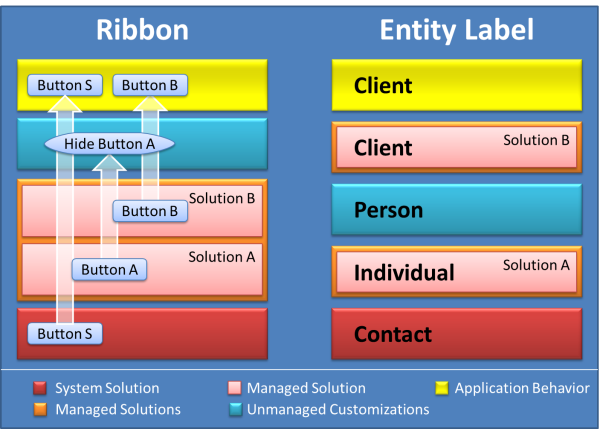
It is important to understand how Dynamics 365 will resolve conflicts. The figure below shows how the different solutions interact with the System solutions resulting in the final application behavior. The system solution is the default OOTB solution. Managed solutions and Unmanaged customization's determine what the user will finally visualize and experience.


When there are multiple solutions Dynamics 365 will resolve conflicts using the two strategies – Merge and Top Wins. 

1. Merge – All UI components are re-calculated and merged from bottom to top. The unmanaged customization are last to be displayed.

2. Top Wins – All other non UI customization's the conflicts is resolved based on the solution components that is applied last.


Update to a Managed solution does not follow the above rule. 

If unmanaged customization's already exists for updates made to a managed solution, the user may not see the updated changes in the organization. The user will be given an option when updating the Managed solution whether to overwrite or preserve any existing customization's on top of the Managed solution. 

In addition the following is to be noted for updates to managed solutions
               1. Forms merging – Any form customization's may need to be further customized after the updates are published. 
                  
               2. Site Map – Site map customization's need to be verified and further changes may be needed as they are also                            getting merged.

In my experience it is better to have a pre-production staging environment to do a complete test before the solutions are deployed to production.

I hope the above helps in understanding and managing solutions. In my next part II of this blog I will write about the solution versioning and patching options.  
Let me know your past experience with solutions and if you are using Managed solutions for deployments.

Thanks for reading.

Mihir Shah

Wednesday, March 8, 2017

Managing Dynamics 365 (CRM) deployments online

Why we need to manage?

1. Multiple environments - 
Dynamics 365 (CRM) online enterprise projects have multiple instances deployed - Dev / QA / UAT.  Clients also want to be able to do continuous development and deliver releases to Production in an agile process. Agile also adds complexity, as we have multiple teams (dev / integration / business) who interact together as the development progresses through different sprints. Hence in a typical deployment you will have possibly many or all of the following instances.
  1. Development
  2. QA
  3. UAT
  4. Integration 
  5. Migration
  6. Performance
  7. Pre-production
  8. Production
2. Multiple user access - 
Each environment has its own team of users who may need access to that specific instance only. There may be few users who need access to multiple environments like Build Manager or System Admin. Also the Solution owner or Build manager maintains and deploy the correct customization code (solutions) for each instance. All of this requires proper planning and management of Dynamics 365 (online) deployments.

Here are some of the options to manage Dynamics 365 deployments -

1. Deployment process – A deployment process needs to be planned out for the Project. In an Agile continuous development the deployments are done in “Releases”. So there could be an initial Release-1 which goes through Dev to Production.  

A typical Release-1 deployment path from Dev to Prod is shown below -
Release-1 deployment path


Once the Production environment is ‘Live’ with Release-1 functionality, it is essential to have a second parallel path for the development and testing of Release-2 functionality. 
In addition a hotfix deployment path is also needed to fix any bugs found in Production environment. A Release-2 deployment can include the following instances.

Production and Release-2 development path

Any fixes done for Production are also implemented in Dev-2 environment. As the Release-2 is ready to be deployed the same path can be followed for deployments for the next Release cycle. Thus providing ongoing Production support and continuous development.

2. Control User Access - 

Security plays an important role in preventing unauthorized users from accessing environments. There are many ways that Dynamics 365 environments can be secured and managed.

  1. Active Directory / Office 365 user access – Dynamics 365 online access is provided through Active Directory / Office 365. Once the user has access to Office 365,  they have to be provided access to the individual instances by assigning them a valid license and a security role. If an employees leaves the organization and their Active Directory access is removed, this also disables the user from all Dynamics 365 environment.
  2. Security roles - This is the next step to grant user access to the Dynamics 365 instance. It is also probably the most widely used (not recommended) method of managing user access to different environments. A user with system admin security role in Dynamics 365 can assign another user a security role – This will grant access to the instance to the user.
If we only manage user access by adding or removing security roles it can be difficult to manage for large number of users. Users may get temporary access to environments and the access never gets removed. It is also a challenge because there is no way of knowing which user has access to what environments without logging in to each individual environment.
  1. Security groups – This is one feature that should be used for managing user access to Dynamics 365 environments. In office 365 users can be added to Security groups. The security groups can than be assigned to the individual instances of Dynamics 365.
Users can be divided into the following groups.
1. Dev
2. QA
3. UAT
4. Integration / Migration
The security groups can now be given access to the corresponding environments. A user who needs access to multiple environments can be added to the corresponding security groups.


3. Solutions Management
 
Solutions are used to move customization's and configurations from one environment to another. The build manager will be responsible for the solution movements and tracking. Solutions can be managed or unmanaged and this depends on the project requirements. 

Dynamics 365 has tools to do Solution patching and versioning which can be utilized. Versioning is important to keep track of the customization's in each environment.


In addition to import and export a solution, there are 3 new buttons as highlighted above. They are
1. Clone a Patch
2. Clone Solution
3. Apply Solution Upgrade

I hope the above assists you in managing multiple Dynamics 365 deployments. Please leave your feedback on how do you manage Dynamics 365 deployments in your project. 

Keep reading.
Mihir


Wednesday, February 1, 2017

Dynamics 365 as a Collaboration Strategy tool

As we are starting the new year, there is the reflection of past experience and observations. One of which I want to highlight, is the increasing use of Dynamics 365 (CRM) as a collaboration strategy tool.


Why Collaborate - 


Since the dawn of internet, businesses worldwide are facing ever changing new challenges, like social media, app driven economy, consumer buying behavior, business models…

In order to manage the competitive forces and competition, firms are acquiring, merging or building strategic partnership. Some of the examples of strategic partnership or collaboration are -

  • Automobile industry – Global partnership between auto manufacturers and parts suppliers to reduce cost of inventory and enhance quality
  • International Air Travel industry - Strategic geographic alliances between airlines to attract the global corporate travelers and increase their market share
  • Retail industry – Retailers adding new products and services and co-branding with firms to become the go to store / website / app for the customer.

The need for collaboration is growing and this is resulting in new business processes and systems designed to integrate business partners and customers to meet the shared goals.


How does Dynamics 365 (CRM) help in collaboration – 


Dynamics 365 has a set of built-in tools that can be effectively used for collaboration. The collaboration tools are discussed below.

  1. Portals – Partner and Customer Portal in Dynamics 365 is the #1 tool for collaboration. Companies now have the capability of engaging their partners and customers with their core business teams and processes.
    1. Partners can be given secure access to the portal. Partners can provide input on sales opportunities, complete an activity or task and add / update documents as needed for the business process
    2. Customers can use the Portal to place orders, check history, request services and provide feedback which will be valuable to the organization
  2. Mobility – You can provide mobile based access to partners with a mobile app. Using the mobile app the partners can log into Dynamics 365, access necessary information and update the records. For example a medical services firm can partner with independent nurses who visit patients, review their medical history and complete their annual health checkups at home using a mobile app.
  3. Field Services – Dynamic 365 Field Services allows the scheduling of service providers and track maintenance of assets. The service providers can be partner firms who get their schedules from the Dynamics 365 and manage their daily service activities. This helps the services organization provide better service to the customer.
  4. Security – One of the most important requirement for a collaboration system is Security. The security can be classified as –
    1. System level access – Restrict which employee of the partner gets access what part of the system
    2. Entity & record level access – Restrict what entity and records within the entity the partner can access - read and edit.
    3. Document access – Restrict access to documents and allow to add new documents
    4. Device access – What devices can be used to access and update data

Dynamics 365 with its granular security achieves all of the above and allows further control using business unit, teams, team queues, security roles, web roles (for portal), role based form…

  1. Process flexibility – A collaborative system has to be flexible and adaptable to changing business processes. Dynamics 365 allows organizations to build upon an existing business process and add or change the process in the future as needed. Partners can be users of Dynamics 365 or can access the data through Portal or a mobile app. Within Dynamics 365 one can build custom business apps for Partners and provide a customized collaboration experience.

As you can see there are many new ways that Dynamics 365 can be used for Partner and Customer collaboration. I believe that more organizations will use Dynamic 365 as a Strategic Collaboration tool to engage partners and customers, improving the efficiency and productivity in their business process.


Please provide your experiences in using Dynamics 365 for collaboration.

Thanks for reading.


Mihir Shah