Thursday, June 15, 2023

10 Things to consider when Managing Enterprise Apps - Microsoft Dynamics 365 on Microsoft Cloud

 Once an enterprise application like Microsoft Dynamics 365 goes live within an organization there is lot of excitement. The project team is happy with the results of the efforts over the year/s. It is the day after going live that the operations team is faced with the post go-live challenges. There are lots of questions on how to support, operate, manage, adopt and scale the new Dynamics 365 application. Microsoft Dynamics 365 in an enterprise cloud environment can be very challenging. There could be multiple integrations with other systems within and outside the organization, compliance and security requirements, business enhancements needs and performance management. This requires planning and coordination with multiple teams. This blog series is about how to prepare and plan for managing of an enterprise Dynamics 365 app. Here are the top 10 things to consider - 


1. Governance (decision making) - There needs to be a governance team in place. There could be multiple operations support teams working on the system for example the application support and maintenance team, the infrastructure and security management team and the application enhancement team. There has to be a defined governance team that may consists of representatives from business, IT, Project and executive management. This helps the operations team to report any blockers, get the guidance and support for the system management. The governance teams meets on a monthly cadence and reviews the teams progress and challenges. They will discuss how to resolve the blockers, improve the operational performance and opportunities for enhancing the Dynamics 365 application.

2. Security and Access control - As the Dynamics 365 application usage increase so does the need to add new users and give them proper access. There could also be challenges with the existing users who may need to modify their security roles, teams and business unit. It is an ongoing challenge to manage the users access and application security which needs to be considered and managed. Assigning a role based user security template will make the access streamlined. 

The tasks for the security team is to regularly review and update user security roles, active directory teams and business units as user responsibilities change. Also remember to remove users and reassign licenses when the users are no longer required to access the app. Finally regularly audit user access logs on a monthly or quarterly basis to identify any unauthorized or suspicious activities. 

3. Data security and integrity - Having a reliable quality data is important for the adoption and success of the Dynamics 365 app. Users should be confident that the data that they rely on to make business decisions is safe and trustworthy. Implement a data governance practice to maintain data integrity and quality. Regularly set reviews, cleanse and maintain data for accuracy, completeness and consistency. Users should be provided training in proper data entry and maintenance standards. 


The data loss prevention rules should be in place to prevent the leakage of data. Sensitive data in the Dynamics 365 app should be protected and secured using field level security. Duplicate detection should be in place and active where needed. It is essential to set-up data validation and duplicate detection rules to prevent erroneous and unreliable duplicate data. Data lifecycle, archival and storage needs to be planned as the data size grows with complexity.

4. Application Performance Monitoring - The Dynamics 365 application and related infrastructure should be continuously monitored for any issues, bottlenecks or maintenance requirements. A mechanism should be in place to trigger alerts and auto create incident support tickets for any identified issues. The error logs, system logs and performance metrics should be reviewed for measuring the performance of the application. Users should be trained in identifying and reporting issues with proper documentation. 

Microsoft provides many options to monitor and manage Microsoft Dynamics 365 and Power Platform. The Power Platform Admin Center has OOTB performance metrics that can be reviewed. Additionally Azure Monitor and Application Insights can be set-up to track and monitor the performance. Additionally you can even use Power Automate to trigger alerts and create incident support tickets.

5. Support Team  - Plan to have a dedicated multi-level support team. The teams can be set-up on a Tiered support level based on the incident complexity, severity and priority. Tier 1 and 2 support can be provided by the organization support helpdesk. Tier 3 support can be provided by the Application Manage Services Partner and Tier 4 support can be from Microsoft product support team. It is important to have the team trained on the business application and on supporting Dynamics 365 and Power Platform.

6. Product updates and upgrades - Microsoft provides 2 major updates annually for Microsoft Dynamics 365. Plan in advance to have the Dynamics 365 updates tested and implemented. 

Safe deployment of updates for Dynamics 365 by region


The business and IT needs will require regular enhancements of the Dynamics 365 application and supporting infrastructure. Ensure proper training of the support team as part of the enhancement of the Dynamics 365 application and infrastructure.

I hope this helps your organization in planning for the post go-live operations and management of the Dynamics 365 enterprise application on Microsoft cloud. Please stay tuned for my next blog where I will discuss the remaining 4 items to consider when managing Microsoft Dynamics 365 enterprise applications. Let me know your thoughts and thanks for reading.

@MihirCRM

365WithoutCode


Wednesday, May 31, 2023

Azure DevOps Pipelines with Power Platform - Part-1 The Benefits

In today's fast-paced world, organizations need secure, efficient and reliable tools to streamline their software development processes. Microsoft's Power Platform has emerged as a leading low-code development platform, empowering businesses to rapidly build custom applications, automate workflows, and analyze data. To further enhance productivity and collaboration, integrating Azure DevOps Pipelines with Power Platform offers a powerful combined solution. In this blog, I will explain the benefits of using Azure DevOps Pipelines in conjunction with the Power Platform to optimize your #PowerPlatform development projects.

1.            What is Azure DevOps Pipelines? Azure DevOps Pipelines is a cloud-based service that enables you to create, test, and deploy applications with speed and efficiency. It provides a robust set of tools for continuous integration, continuous delivery (CI/CD), and release management. By incorporating Azure DevOps Pipelines into your Power Platform projects, you can automate build, test, and deployment processes, ensuring consistent and reliable software delivery.

ADO Pipeline monitoring in Power Apps


2.            Key Benefits of Azure DevOps Pipelines for Power Platform:

a. Seamless Integration: Azure DevOps Pipelines seamlessly integrates with Power Platform, offering a unified environment for managing the entire application lifecycle. From version control and code collaboration to automated deployment and monitoring, all development stages can be orchestrated within a single platform.

b. CI/CD Automation: By configuring continuous integration and continuous deployment pipelines, you can automate the process of building, testing, and deploying Power Platform solutions. This not only saves time but also reduces human errors, ensuring consistent quality throughout the development lifecycle.

c. Version Control and Collaboration: Azure DevOps Pipelines provides version control capabilities, allowing multiple developers to work on the same Power Platform solution concurrently. With features like branching, merging, and pull requests, you can manage code changes effectively and promote collaboration among team members.

d. Agile Project Management: Azure DevOps Pipelines integrates seamlessly with Azure Boards, enabling you to manage and track work items, backlog, sprints, and project progress effectively. This integration ensures that the development process aligns with Agile methodologies, facilitating transparent communication and enhanced project visibility.

e. Extensive Library of Tasks: Azure DevOps Pipelines offers an extensive library of pre-built tasks that can be easily customized and configured to meet the specific requirements of your Power Platform projects. From environment provisioning and solution packaging to testing and deployment, these tasks provide a comprehensive set of tools for efficient project management.

I hope this blog helps you understand the benefits of leveraging ADO Pipelines with #PowerPlatform. In my next blog I will write more about how to use ADO Pipelines and #PowerPlatform better together.

Thanks for reading

@mihircrm

365WithoutCode

Sunday, March 26, 2023

Dynamics 365 - 2023 Wave-1 - Customer Service part-1

 We are back again, this time for the 2023 wave-1 update on Microsoft Dynamics 365. This blog will focus on some of the Dynamics 365 - Customer Service update that can be expected in April 2023.

1. Knowledge base updates . I have worked with many clients who are using the built in Microsoft Dynamics 365 knowledge base (KB). Clients service reps are using the knowledge base articles available in the Customer Service app in a call center environments. Many of the Clients also showcase the knowledge base articles on their Customer or Partner Portal.

Now the Customer Service Reps can add the KB articles to their favorite list. This helps them to refer back to the KB articles quickly.   This is shown in the pic below.

Mark KB article as favorite

Additionally now you can add external sources as knowledge base. This will help organizations that have the KB stored in for example Sharepoint to upload the KB articles and make it available for the Customer Service agents to do a search. I think this is very useful for Clients who have an existing Knowledge base site.

This is enabled by adding External Search Providers in the Customer Service Admin App > Agent experience > Knowledge section. Refer to the pic below.

External Search Provide options

 There are 3 options to add external search providers 

1. Cross Organizational Search - This will allow you to select any Dynamics 365 org within the same tenant. Thus you can add the KB articles from another org into your Dynamics 365 org.

2. SharePoint - You can add any SharePoint site URL within the same tenant. If you are maintaining a SharePoint site with information, you can add the URL and the users will be able to do a search for information on the SharePoint site from within Dynamics 365.

3. Microsoft Graph connector - If you have implemented Microsoft Graph you can add the connection ID.

One thing to note is that the Customer Service Rep doing the External Search will also need access to the external data in SharePoint or Dynamics 365 org or the Graph connector.

Below pic shows how the external data will show up when doing a KB search from within a Case record. 

External Search Results
Microsoft uses AI to analyze and show the relevant search results from both internal and external sources.
Hope this helps to enhance the KB article and search experience for your users. I will write more about other topics in Wave-1 release.
Thanks for reading.

@mihircrm
365WithoutCode


Monday, November 28, 2022

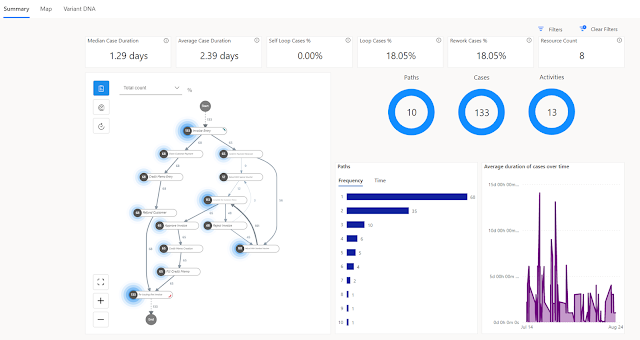
What's New in Power Platform - Process Mining

 This is a continuation of my blog series - What's new in Power Platform for the 2022 Release 2. This time the focus is on Process Mining using the Process Advisor. I will discuss here the need for a business process review and how a tool like process advisor can be useful for the organization. There are some paradigms to reflect upon,

"That's how we have always done it"

Organizations have been running business processes for ages on their ERP / CRM platform of choice. The processes may get modified over time and there may be "process debt" which is some old process that is still leftover in place because that was the way the system was set-up. In fact I have asked many clients why they do it in a certain way and the most common answer was "that's how we have always done it here!!"

"We are special" 

Another common answer to the question is "we are special" or "our business is unique". Every client is unique in the way they want to operate their business processes and that can create an ego issue when recommending solutions. I have worked with Clients who have changed their Systems three times but they refused to modify their business process. It is always the systems fault!!

"You cannot improve what you cannot measure"

I normally look for quantifiable data to prove to the client the benefits of a process change. When I ask the Client for any measurement on their business process KPI's they are looking at me as if I am from another planet. What's the point of implementing a system whose performance you cannot measure? How do you ensure the process is working or not? How do you plan to improve??

 That is where the Process Mining can help. It may be time to re-evaluate your current CRM / ERP processes. This will help in -

1. Setting a baseline - How are we doing today? How fast do we complete a Customer support case? What is our Lead to Opportunity conversion ratio?

2. Identify process bottlenecks - What is the longest stage / step in providing a Customer quote? Where does the Case gets stuck the most? How many variants of the process are there?

3. Automate - Identify what can be automated? Provide a business case for automation? How much can we decrease the Call Center agent time by automating certain steps? Do we really need to wait for an approval for all Cases? 

4. Re-evaluate your process - Is it required? obsolete? What are the competitors doing? What can we improve? Are we in compliance?

 Microsoft has recently announced the public preview of the Process Mining capabilities with Minit and Power Automate Process Advisor. 

Process Mining - map and dashboard

Some of the new capabilities added to the Process Advisor are detailed here -  https://learn.microsoft.com/en-us/power-automate/process-mining-overview

Highlights -

  • Improved web experience 
  • New Minit Desktop App for deeper analytics 
  • Customizable reporting using Power BI and new pre-built templates

In order to get all the benefits of Process Mining you may require multiple licenses that includes - Power Automate per user, Power BI premium, Microsoft Dataverse etc. If you already have all the required licenses why not try and make use of Process Mining today?

I will write more about the new Process Mining capabilities in my future blogs. Till then let me know what is your thoughts on Process Mining and how it can help to change your business processes. Thanks for reading.

@mihircrm 

365WithoutCode


Monday, October 31, 2022

What's New in Power Platform - 2022 Release wave 2 - Managed Environments

       It is that time of the year for reviewing what's new in Microsoft Power Platform for the 2022 Release Wave-2. In addition to the many enhancements to the existing functionality there are also new features that are being added. In this blog I am reviewing the new capability of Managed Environment.

As the Power Platform is becoming mainstream in the enterprise domain, there is the need to set boundaries and maintain governance. Just like the new shiny toy that every kid on the block wants as present, the power platform, once introduced to the users, they will want to play with it. The power users want to try, make and see what is the realm of possibilities with and within the platform. They will find out sooner that it has a lot to offer and all with no code or less code. This can get out of control very fast same as the gold rush!!

Microsoft has realized the problem at hand and provided apps and guidance for managing the power platform. This guidance came in the form of the excellent - Power Platform Center of Excellence kit. To add to that Microsoft is also releasing the Managed Environments capability.

What is a Managed Environment ?  Managed Environments is a suite of capabilities that allows admins to manage Power Platform at scale with more control, less effort and more insights. Basically to do more with less.

Note - One of the requirements for an environment to be enabled as Managed Environments is that all the users in the environment should have premium usage rights for example - a Power Apps or Power Automate - per user or per app per user stand alone plan. 

Managed Environments elements

Currently there are 3 elements of Managed environments and I hope more are added in the near future.

1. Limit Sharing - This helps to prevent makers from sharing Canvas Apps with security groups and also limit the # of people the app can be shared with by the makers.

Limit Sharing
This is useful in a Dev environment you want the maker to to limit sharing and test it before sharing the app to other users. This will also limit the # of apps that a user sees in the environment.

2. Usage Insights - This provides a weekly email digest for Power Platform admins and Dynamics 365 Services Admins on the Managed Environments. The email gives insights as below -

Active apps / flows / users in the last month
This shows how is the adoption rate of the apps. A graph of the active app users will be more useful to show the growth of adoption over time.

Last time the app was used

This shows what apps are no longer being used. IT can ask the maker to remove / delete the app if it is no longer being used. Good for keeping the environment clean and useful.


Most useful apps and flows

This shows the top run apps and flows. Makers can learn from the top used apps / flows and update their apps.

3. Data policies - This shows all the data policies applicable to the managed environment. 

Applicable Data Policies

I will update my blog as new elements and capabilities are added for Managed Environments a step in the right direction to do more with less. I hope this helps you in deciding upon and enabling Managed Environments capability.

Thanks for reading. 

@mihircrm | 365WithoutCode


Friday, September 30, 2022

Enhancing legacy ERP systems with Microsoft Power Platform

On-premise ERP Systems have been the default system of record for the past 30+ years. They are the legacy systems used by millions of business globally which are running strong but lack modern technology. Organizations can find it difficult to improve their business processes and user experience without upgrading or moving the systems to a new cloud-based ERP application like Microsoft Dynamics 365. Organizations may also have challenges finding the necessary talent to incorporate complex AI / ML with their existing on-premise legacy apps. 

One option is to use Microsoft Power Platform to enhance the legacy ERP experience. Microsoft Power Platform is a low code application platform (LCAP) that provides multiple components (refer below figure) to use with existing system of records and add new technological capabilities. This blog discusses some of the business process automation that can be enabled by Microsoft Power Platform.


      #1 - Order to invoice process – Consider the scenario of a order to invoice business process. Typically, a customer sales order is received from website or email as an attachment and entered into the CRM or ERP system. This leads to the user creating a purchase order in the legacy ERP system to procure materials or products from the supplier. Supplier processes the PO and ships the products to the Customer (drop ship). Supplier sends packing slip and invoice to the business.  The business user invoices the customer. In a legacy ERP system, this can be a very manual, error prone and time-consuming process as the volume of orders increases.  


Order to Invoice process

This process can be automated and here are some scenarios where Microsoft Power Platform can be used along with the legacy ERP application.

  1. Automate Order Entry – Using Power Automate the entering of the order from email or as an attachment can be enabled. Power Automate cloud flow can trigger AI builder to scan and read the email attachment and capture the items that are ordered by the Customer. The cloud flow can trigger a Power Automate Desktop flow to enter the ordered items in the Legacy ERP system.
  2. Automate Vendor Invoice entry – As above the Power Automate can also be used to automate the vendor invoice entry into the legacy ERP system.
  3. Email to Customer – Power Automate can be used to trigger an order delivery email to the Customer when a Packing Slip is received from the Vendor.

There are many such use cases that can be automated using Microsoft Power Platform. An example of utilizing Microsoft Power Platform along with SAP CRM and SAP ERP applications is also shown below.


In this example Azure Data Factory is used to get data from SAP CRM and into Azure SQL. Then Power Automate flow and AI Builder is triggered to complete the automation.

Some other examples of using Microsoft Power Platform are also discussed below. 

#2 - Customer Chat-bot - Power Virtual Agent can be used on the Portal to answer queries from Customer. Customer goes to the Portal and want to know the status of the order. Power Virtual Agent can be enabled to trigger a Power Automate Flow to query the database and get status of the order and provide the information to the Customer. The Chat-bot capability can also be enabled to assist in answering queries on product inventory and pricing.

#3 - Gain business insights – Power BI can be used to develop visuals and dashboards to gain insights from business data. Power BI can connect to legacy on-premise systems using the data gateway. Power BI Desktop can be used to develop powerful visuals dashboards. Power BI can help empower business users to work with the data, model complex business scenarios and get insights they need to take actions and business decisions.   

Microsoft Power Platform as a low code app platform can help to empower your employees to do more with your existing legacy applications. Hope this makes you to try one of the Power Platform products. Do let me know about your experience using Microsoft Power Platform with your existing legacy applications.

Thanks for reading.

365WithoutCode     

@mihircrm


Thursday, August 18, 2022

Microsoft Dynamics 365 Omnichannel for Customer Service – Part-1 – Unified Routing

I have worked on many enterprise projects that requires an engine to intelligently route work related records to their destination. This is especially true for Customer Service where in the incoming work must be routed to Agents. The understanding and design of Work routing is crucial for the ability of the organization to scale as the workload increases due to addition of new work items / customers and service transactions. 
 Now in the world of Omnichannel the work item can be part of any channel – for example SMS Text, Voice, Whatsapp, Chat or Email. There are more complex rules for Routing the right work item to the right Agent without delays. Workers need to be skilled to perform the work and they could be specialized in only certain type of work. Additionally, the Customer Service systems has to support multiple languages too. 

Thankfully we have the Unified Routing engine in Microsoft Dynamics 365 Omnichannel for Customer Service that can help us in configuring most of the business rules. This blog introduces some of the benefits of implementing Unified Routing in Microsoft Dynamics 365 Omnichannel for Customer Service. 

What is Unified Routing? 

 As per Microsoft – “Unified routing is an intelligent, scalable, and enterprise-grade routing and assignment capability. It can direct the incoming work item to the best-suited queue and agent by adhering to work item requirements and matching them with the agent's capabilities.” Unified Routing in Microsoft Dynamics 365 Omnichannel for Customer Service works as shown in the following figure.

Unified Routing - Omnichannel for Customer Service

The following is a brief overview of the Unified Routing process in Dynamics 365.

Work Creation – Work item can be originated and ingested from Customers via any channel. This can be Voice, SMS Text, Social like Facebook or Twitter, Chat or Email. This work item gets created as a record in Microsoft Dynamics 365 and is part of the Channel Workstream in Microsoft Dynamics 365 Omnichannel for Customer Service. The following is a list of Channels that can be created.

Channels in Omnichannel for Customer Service

Work classification – The first step that Unified Routing does is to classify the work item. The classification can be based on the Customer category (Silver, Gold), Urgency (SLA), Skills required, Language etc. Machine Learning models can be created and applied to classify the work item (I will be writing about this in a future blog). Classification is an important task to be able to better understand the work item characteristics and assign to the specific queue that match the same.

Work Assignment – Once the work is classified the next step is to assign the work to the right Queue and Agent within the Queue. During the assignment stage, the work items are assigned to the appropriate queue. You may have separate queue based on the Customer category (Silver/ Gold) or the type of work (Request for information, transaction issue, returns) etc.

Once the items is assigned to a Queue the item is prioritized. This makes sure that the Agents are assigned the high priority item first. Then the work item is assigned to the agents based on the work characteristics, agent skills and capability, and the current state of the agent workforce in terms of availability and workload.

The benefits of using Unified Routing are

1. Matching Customers with the right Agents for first time resolution

2. Classification of work items using Machine learning models

3. Work item prioritization within a queue

4. Work item assignments based on Agent capacity, presence and skills


The Unified Routing process helps in managing Customer Service workload for the organization. There are many set-up and configuration requirements to ensure that the Unified Routing works and is configured for the business process as applicable for the organization.

I will write more about configuring and enabling Unified Routing for Microsoft Dynamics 365 Omnichannel for Customer Service in my future blogs. Thank you for reading.

Mihir Shah I @mihircrm I 365WithoutCode